






Top Android TV Tips & Tricks You Should Know

Top Android TV Tips & Tricks You Should Know
Android TV has become one of the most popular smart TV platforms in 2025. With access to thousands of apps, games, and streaming services, it can do much more than just play Netflix or YouTube. However, many users aren’t using their Android TV to its full potential.
Here are the top tips and tricks that will help you get the most out of your Android TV or Android TV Box.
---
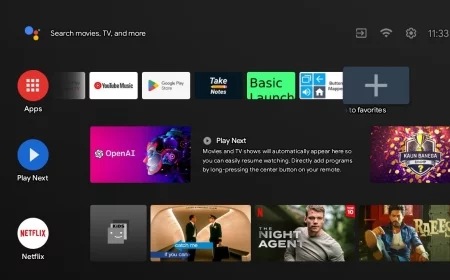
🔹 1. Customize Your Home Screen
Rearrange apps: Press and hold an app on the home screen to move it where you want.
Remove unused apps: Keep your interface clean by uninstalling apps you don’t use.
Add favorites: Highlight your most-watched apps for quick access.
---
🔹 2. Use Google Assistant Efficiently
Android TV comes with Google Assistant, allowing you to:
Search for shows or movies using voice commands.
Control smart home devices connected to Google Home.
Get weather updates, news, and sports scores without leaving your TV.
Tip: Press the microphone button on your remote or use the Android TV Remote app on your phone for hands-free control.
---
🔹 3. Install Apps Beyond Google Play
Sometimes, apps are not available in the Play Store. You can:
Sideload APKs from trusted sources using a USB drive or cloud storage.
Use apps like Downloader or File Commander to manage installations.
⚠️ Always ensure the APK is from a reliable source to avoid malware.
---
🔹 4. Improve Streaming Performance
Use Ethernet instead of Wi-Fi for faster, more stable connections.
Enable Hardware Acceleration in app settings (Netflix, YouTube, IPTV apps) for smoother playback.
Clear cache regularly to free up memory and improve speed.
---
🔹 5. Enable Developer Options for Advanced Features
To unlock advanced settings:
1. Go to Settings → About → Android TV OS Build.
2. Click the Build number 7 times to enable developer mode.
3. Access Developer Options to adjust settings like USB debugging or animation scales for faster navigation.
---
🔹 6. Cast from Your Phone or Tablet
Use Google Cast to stream content from your phone, tablet, or laptop to your Android TV.
Works with apps like YouTube, Netflix, Spotify, and more.
Saves time and gives flexibility to share content on a bigger screen.
---
🔹 7. Manage Storage and Memory
Go to Settings → Storage & Reset to see which apps consume the most space.
Uninstall unnecessary apps and clear cache regularly.
For Android TV Boxes, consider external USB drives or SD cards to expand storage.
---
🔹 8. Use Shortcuts and Quick Access Features
Many Android TV remotes support customizable shortcuts.
Set one button for Netflix, another for YouTube, or your favorite IPTV app.
This saves time and improves navigation efficiency.
---
🔹 9. Enable Night Mode or Dark Theme
Dark mode reduces eye strain and gives a modern look to the interface.
Go to Settings → Device Preferences → Display → Theme and switch to Dark.
---
🔹 10. Keep Your Android TV Updated
Regular updates improve security, compatibility, and performance.
Check Settings → About → System Update to ensure you have the latest version.
---
🔹 Final Thoughts
With these top Android TV tips and tricks, you can unlock the full potential of your smart TV. From improving performance and storage management to customizing the interface and using Google Assistant effectively, these strategies make your viewing experience smoother, faster, and more enjoyable.
Android TV tips and tricks, Android TV guide 2025, Android TV hacks, best Android TV tips, Android TV Box tips, Google Assistant Android TV, customize Android TV, improve Android TV performance
What's Your Reaction?
 Like
0
Like
0
 Dislike
0
Dislike
0
 Love
0
Love
0
 Funny
0
Funny
0
 Angry
0
Angry
0
 Sad
0
Sad
0
 Wow
0
Wow
0